
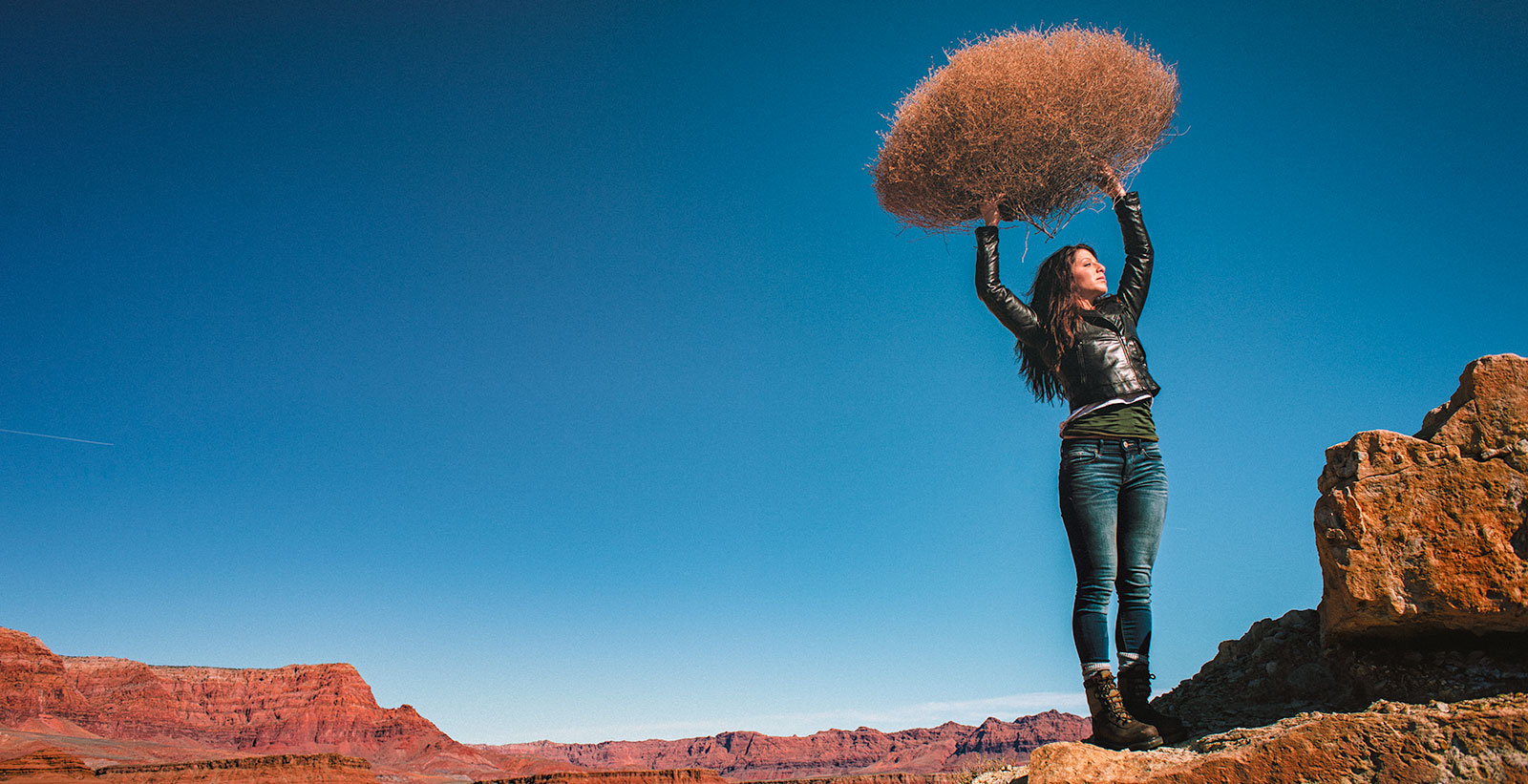
LIGHTING PRINCIPLE THREE: THE COLOR OF LIGHT
We see light usually as a white source, or at least a neutral source.
It isn’t. neutral, it has a color to it and that color can influence all the parts of your image, from shadows to highlights. We don’t see the color of light because our brain changes it to a neutral “white” color as we see it.
Here is a wonderful article that explains the way that the color of light affects your image. Read it now.
When we look at the color of the scene in front of us we can change it globally by changing our color balance in the camera, or using a filter. What “globally’ means is that everything in the photo is changed to the same setting. All the colors are altered by this global change to the color of the light.
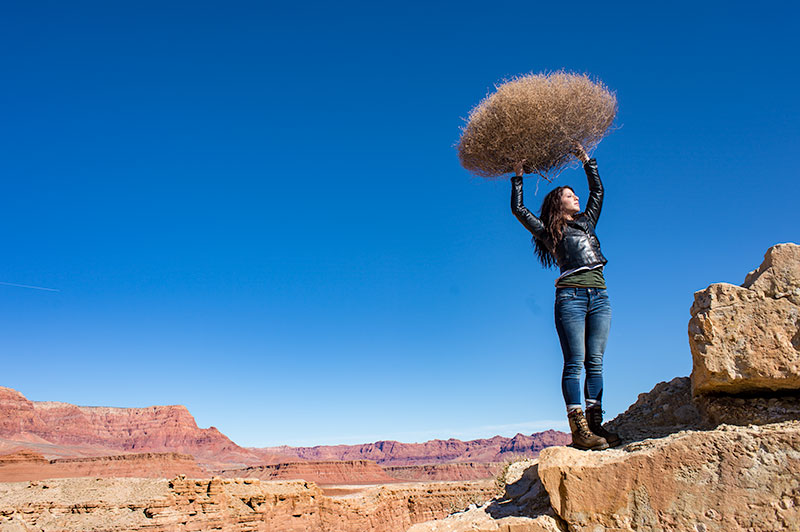
On the left is a photograph taken near Mable Canyon. The sun was quite bright, and there was a bit of warmth to the image because of all the warm browns and oranges of the topography all around us.
This image is as shot. I have applied global changes to the color of the light source so you can see what that does to the image.
Below from left to right:
Daylight / Shade / Tungsten / Flourescent
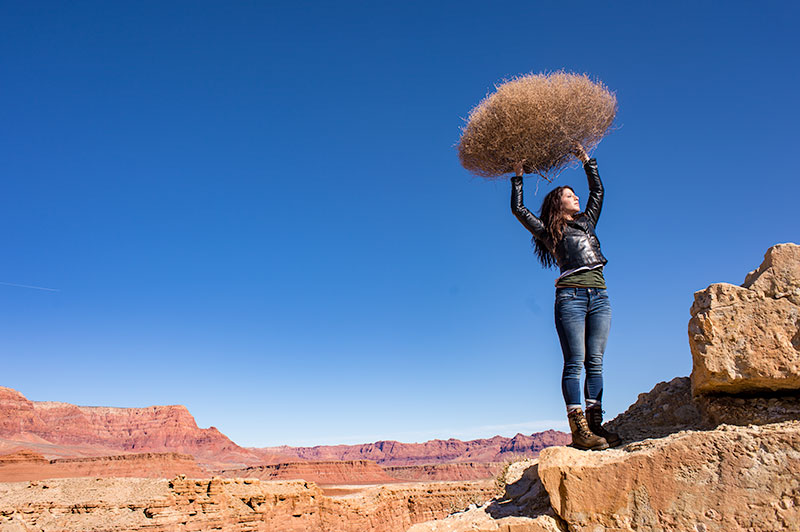
DAYLIGHT
Changing from As Shot to Daylight shows very little difference, although the daylight color balance makes it a bit more warm.
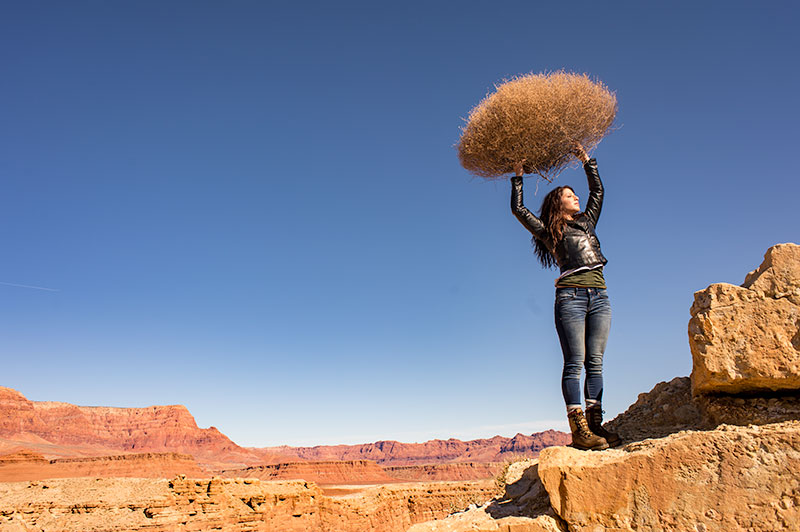
SHADE
Since the color of the light in the shade is a bit more blue, we add some warmth to the overall image to compensate for it. In this shot you can see the global warmth is not going to work because the image was not shot in the shade.
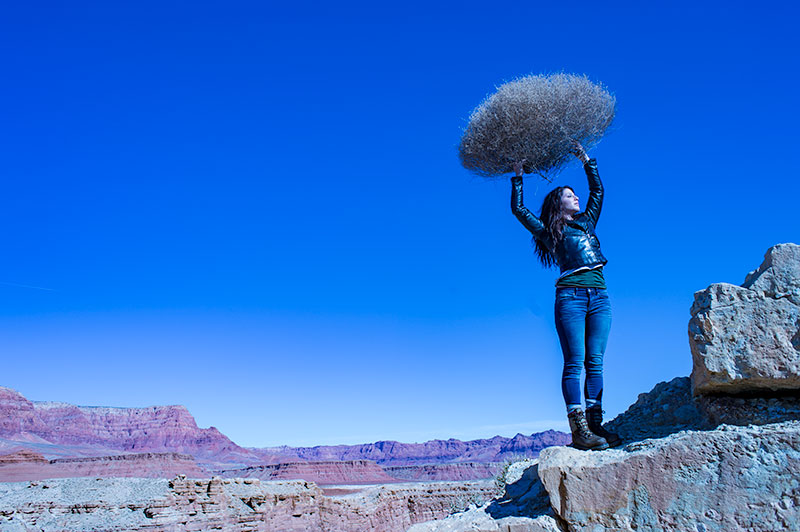
TUNGSTEN
Tungsten light is very orange, so when we apply a tungsten color balance to a shot that is not too orange, we get this very blue looking shot. This is a good reminder of just how ‘warm’ tungsten light is if it takes this much blue to make it correct.
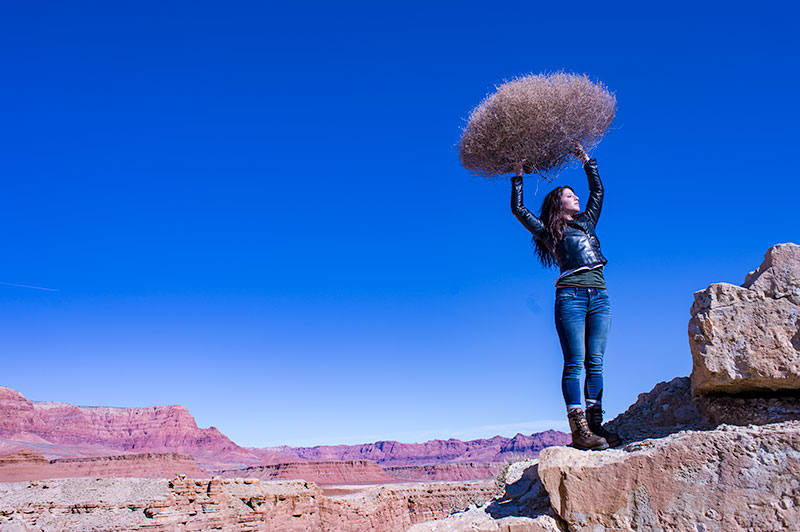
FLUORESCENT
Fluorescent light is blue/green so it makes it difficult to compensate for. In this application of the fluorescent color balance, we can see the sky going a deep blue, while the desert mountains behind become more magenta.
LOCAL LIGHT SOURCE MATCHED TO AMBIENT
Working with a secondary light source that may be a different color presents us with a challenge. We cannot change the image globally because adding a correction to the image to correct for the different light source will affect the entire image.
We must then change the different light source to the ambient (or overwhelming light) in order to ‘balance’ the subject in the ambient setting.
The ambient setting is the overwhelming light that we usually cannot change: the sun, a large warehouse, a home. Bringing in our own lights means we must know how to match what we bring to what is there.
ASSIGNMENTS FOR THIS CLASS:
- Using the color settings on your camera, take the same image with each of them. Shoot with Daylight, Shade, Tungsten, Flourescent at least and do this in places where those colors exist. In other words, shoot some images outside, inside with regular household lamps, and some place that has Flourescent. (NOTE: Many big box stores use a light source known as Mercury Vapor. Mercury Vapor is blue/green so it is very difficult to adequately address. We can add magenta to offset the green, but that turns the blue part of the light to purple. If we address the blue with something warm, we add that to the green part of the light.For Mercury Vapor correction, try “auto” on your camera setting. It is the best I have found for correcting most of that blue/green color shift.
- Using a strobe (speedlight), take a photograph of someone while the sun is going down behind them. Do not alter the strobe setting, just let it keep making the shot as the light turns warmer and warmer. You will then see how “blue” the light source seems coming from the flash.You may have to change the settings as the light gets dimmer, but I think you will see the changes pretty well.
We will be addressing color balance in all of the upcoming classes.
Project 52 Photographer, Pete Hudeck
While these guys and gals from Project 52 are sharing their adventures with you all, I am busy creating new content and preparing the Project 52 project and the new Lighting Essentials website. I love how much they share. Meet Pete Hudeck, another who has been with...
Project 52 Photographer Kathy Jan
Kathy Jan found Project 52... and while it was a bit daunting to her at first... she stuck to it, made the assignments - and more usually - and learned a great deal. Her work is now pretty darn fine. I think she has shown tremendous growth. Here is Kathy Jan in her...
Project 52 Photographer: Rob Davidson
Meet Photographer Rob Davidson, from New York City. Rob Davidson Rob Davidson Photography Website Email RobD3 on Flickr Facebook "For the past few years I have been clambering to gain knowledge and insight as a photographer. My hobby had taken that turn to become an...
Project 52 Photographer: Bret Doss
Meet Bret Doss, a Project 52 participant and a friend. I met Bret a while ago when I taught my first workshop in Seattle. He truly loves photography. Website Facebook Twitter "Project 52 presented a unique opportunity: ongoing instruction and critique each week for 52...
New Years : New Changes, New Attitudes, New Looks, New Projects
NOTE: POTTY MOUTH ALERT... Just in case I sound like all those 'oh-so-cool' women bloggers who drop f-bombs and tell us about their sex lives ... ick!" It's time for a change. it's time to get busy, change shit up, make new plans. Stop old habits and forge new ideas...

Project 52 Photographer: Ron Heusser
Meet Ron Heusser from Washington State. Ron is active in the Project 52 group. Project 52 Experience Ron Heusser Ron WA on Flickr "I'm a mechanical engineer for my day job, but have always had an interest in photography. I have pursued landscape shooting for the last...
Project 52 Photographer: Christopher Bersbach
Project 52 Photographer, Christopher Bersbach checks in with his thoughts on Project 52. "I had been a follower of Lighting Essentials, as well as several other online photography resources, for a while before Don started Project 52. s a self-taught photographer, I...
Project 52 Photographer: Don Fadel
Another Project 52 participant, Don Fadel, checks in from Florida. "First of all I would like to thank Don Giannatti (historically “WizWow”) for establishing Project 52 and taking the time to organize and critique the images. This was a major commitment on his part...
Merry Christmas and Happy Holidays from Wizwow and LE
Thanks to everyone who took part in LE, the Project 52, all the workshops and my clients. Have the happiest of holiday seasons... And please remember, I am a drummer. 😉
Project 52 Photographer: Hiram Chee
We will be featuring some of the photographers who spent time with Project 52 this year (2011). These are their own words, and I am proud of each and every one of them. Whether you want to do every assignment or just one or so a month, you should consider being a part...
Light or Dark Backgrounds for a Portrait? Sometimes it is Subject Driven
Many times when I am preparing to shoot a portrait, I have to make a decision on background color. I check three things: the purpose of the shot, the model's features and hair color and wardrobe. First of all - there is no right way to do this stuff. Anyone who tells...
Smile or No Smile? In Portraits It’s All About the Eyes
I love the simple portrait/headshot. I would be happy to shoot faces every day. Old faces, young faces, tired faces, happy faces, sad faces and more. The human face has so many facets of interest. When we are very young, we learn to recognize faces. Mom, Dad,...
Shot Under Moonlight with a Touch of Streetlight for Kicker… ahhh, Kodak 3200
It was a muggy summer night in Chicago. We had been shooting all day and wrapped a three day catalog shoot. We took a few hours to eat and go dancing at a club near the studio, and then go back to the studio to shoot some more. I don't remember the year... late 80's I...
24 Project 52 Images to Inspire Your Weekend
These are some of the wonderful shots from a while back at Project 52. We are gearing up for another great year of shooting - and remember, you can join anytime. Just start shooting and posting the images for critique. A new site is forthcoming, and more information...
Beautiful and Unique Photographs In Our Charity Print Sale
We are doin something a bit different on this post. Kinda like PBS's "Dialing for Dollars" only the money doesn't go to us, it will be going to the Toys for Tots Charity. We are simply showing off some wonderful images that our Project 52 folks have done, and offered...
2012 Brings a Lot of Changes to Lighting Essentials – A Heads Up On What’s New!
(LOOKING FOR A COOL AND UNIQUE PHOTO GIFT? Check out our Lighting Essentials Charity Print sales page. Only $27 for a 14" print, with shipping included. All profit will go to Toys For Tots, the Marine Charity for kids. See the Charity Print Sale page for more...
No Magic Pill, No “Easy” Button! What’s a Photographer To Do?
I recently spent some time in my studio with a photographer who was struggling a bit to find his 'style'. He thought that I could help him find what it is that he was doing wrong, and came by for a long working lunch. His assumption that I could help him find his...
The “Business” of Photography: Have I Lost Perspective, Or Simply Disconnected?
OK... Snarky Rant follows: You have been warned. So there's this photographer on Google +, Colby Brown, and he is writing a book about Google + and photographers. He decided to run a contest or something like a contest, to get some photographers who are actively...
Designing The Image You Want (a Chapter from My Book, Lighting Essentials)
Today I present an excerpt from my book, "Lighting Essentials: A Subject-Centric Approach for Photographers" now available from Amazon and fine book retailers all over the world! Whew! It is really interesting that yesterday I got a knock on the door and was handed...
Thanks is for Giving, and I Need To Do Some Givin’
It is Thanksgiving week in the US. It is a day that was set aside to give thanks for all that we have and take a moment to reflect on our year. It is also a time for being gluttonous, preparing for the biggest shopping day in the year and when family who may not speak...
What Happens When You Do Everything Right, And It Still Doesn’t Work?
There was a very interesting post over at Kirk Tuck's blog this week. It had to do with only being as good as the last shot, and how some great photographers are watching their careers slow precipitously, even while still being recognized as top level photographers....
Fear and Loathing in Photoville
Last week, Zack Arias received an email from someone excoriating him for ruining the photography business, teaching "n00b's" misleading information, fouling the water, defiling the tenants of Mordor, and general misbehaving. Or something. You should read it here, and...
Question and Answer Friday at Lighting Essentials
I was wondering aloud on twitter last night and asked if anyone had any questions they wanted answered... four tweets later we had these. One I believe I answered by tweets, but these three were so strong that they needed more than the 144 character response. Here...
It’s the Wild and Wacky “Winner Gets ME” Contest at LE (this will be fun!)
Wacky Winner Gets ME Contest. Yep – I will either come out to you and do a one on one workshop, or you can come here to do one in Phoenix. If you decide to come out here, airfare will be taken care of round trip (there are some caveats – see below). The workshop is...