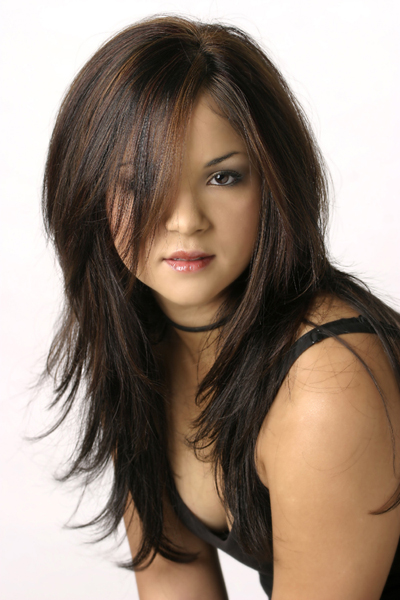
 Asked to shoot 40 non-models at an upscale salon was quite a challenge. I needed a light that would serve many different faces and people types. I would literally have only a few minutes with each and they would be nervous so working the light in many different ways was out of the question.
The single umbrella has always done well for me in these situations. I use a big 54″ white umbrella with black backing to mitigate spill. In this one umbrella I used a 200 WS strobe so I could get a very large aperture. Limited depth-of-field is the look I was going for, so the images would have a more ‘immediate” or casual look.
The seamless was angled toward the light to make sure I got as much as I could without fall-off. The boom held a bright shiny card angled to bounce light down on the models and there was a small, white reflector angled slightly up at the model on her left. It and the umbrella were very, very close for maximum softness. Look into her eyes and you will see both.
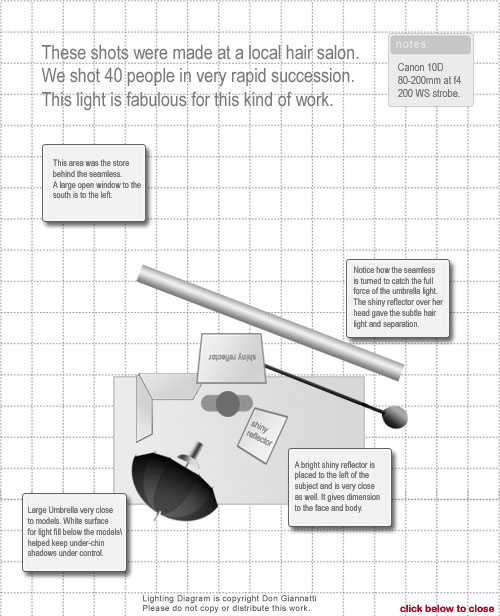
I also placed a 4×8 sheet of white board on the ground to work on. This kept the dark carpet from adding unwanted shadows under the chin, nose and eyes.
Post-processing included a bit of lightening of the white background, some careful skin retouching and Skin FX plug in for Photoshop which gave the women a glamour look without destroying the sharpness of the hair styles. Sorry, no setup shot on this one.